Showing posts with label Useful Links. Show all posts

Saturday, May 23, 2015

Useful Links

Something like Photoshop
Hey folks!

     It has been awhile. How have y'all been? Well us girls are doing fine here too. Moreover, I come to you today to introduce a site that I found when I needed something similar to photoshop. Now of course there is Adobe photoshop thingy but when I tried to make an account it was asking me for my credit card information, yet it was offering me a free trial from what I recall. Well I came across this decent and intriguing site that suited my needs: Pixlr Editor. Pixlr Editor is an online photo editor that does simple things for a quick fix and such. I came across this because for my current art exhibition, which was all photography, I needed something like photoshop to edit and distort some of my photos. This site saved me because I refused to give my credit info unless I was willing to constantly use Adobe Photoshop a lot (in which I have no need), or I was going to buy a who-knows-what $1000+ program just to edit nine pictures. Pixlr Editor came just in time. Plus, I did not need to do a lot of editing and distorting. It was more like putting a lot of filters to make my picture looks cool. Moreover, I think this is site will be useful to those who just need some quick fixes, distorts, filter, etc.

Here is the link so you can check it out:     http://apps.pixlr.com/editor/
I think y'all will like it.

Here are some pics:


Enjoy.

- Felicinda J.

Tuesday, May 5, 2015

Useful Links

An Easy Way To Organize Yourself

Hey Everyone!

     As you may have read in our previous blog post, we have recently finished our IB Mock Exams for all courses! I knew this round of testing would be a tricky one...the time constraints were strict, black or blue pen had to be used, the desks had to be exactly 1 meter from each other - the whole nine yards.  As soon as the time felt right, I forced (yes, forced) myself to sit down and create a study schedule for myself. That way, I would not easily get side-tracked from what needed to get done. I started by listing all of the subjects I take. After doing so, I wrote down each chapter, topic or theme that corresponded to it so that I would know exactly what to study. I then estimated how long I thought it would take me to revise each chapter/topic/theme. After making it simpler for myself, I then created a crazy schedule. I planned each day of the week (during Spring Break) down to the last minute! Here's a snippet of what I did on Monday, for example:


     As you can see, my schedule left me very little free time. But what kept me going was the fact that once Mocks were over, I would have the satisfaction of knowing I did everything in my power to do well, and that I could relax for the rest of the year! With that mind set, studying seemed very worth it to me. 

     Now, a lot of you guys may not wish to plan out your schedule by yourself on an Excel Spreadsheet. That was one of many ways that I thought would be most productive for myself. This is where the Useful Links portion of the blog post comes in. I found a website that would work great  for those of you who prefer to stay organized in a more technological manner. The website is called myschoolbinder.com. From the title of the website you can probably tell that it is an online version of your school/homework planner. By creating a free account for yourself, you can use and access your own personalized calendar to keep track of due dates, study schedules and more. Even better, you can send yourself reminders of what you have to do each day. This is perfect for our 21st century audience who sees little use of ink and feathers nowadays - this website is completely digital. 

     I hope this helps any of you who were looking for ways to stay focused during exams week. This definitely did it for me, and it paid off as well :)

Thanks for reading!

- Sophie F.

Saturday, April 25, 2015

Useful Links

OverDrive
Hey y'all,

     So how is everything going for you individuals? For us 11th grade girls, it has been very busy lately because we have Mock Exams the following week - so we have been studying like crazy. Overall, everything is okay. Today I wanted to introduce you to another very cool app that our Librarian, Ms. Jenna, showed to us. I think it is a great app for book lovers.

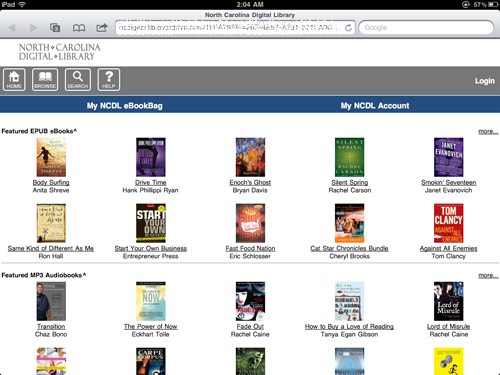
     OverDrive is an American DIGITAL distributor of eBooks, audiobooks, videos, and more from your local libraries. The only thing you need is a library card. There are millions of books, thousands of libraries and this one app that can give you an opportunity to download a book (or whatever you desire to check out from the library) to your electronic device. The coolest part is that when your time is up with the book and it is time to "check it back in", the book will automatically erase from your device! So there is no need to worry about bringing the book back to the library. You can get the OverDrive App for you iOS, Android, Chromebook, Mac OS, Windows, and Windows phone. Now, I understand that having the physical copy of a book feels better than the digital, but this app can and will come in handy for various things, such as research papers! I recommend this app, and you know what else????? IT IS FREE!!! Who does not like free - free is awesome! We are all peacocks in this world trying to fly. Go and get the app, por favor :)

Here are some pics:


- Felicinda J.

Saturday, April 4, 2015

Useful Links

Twitter Accounts

Hey guys!

     Today, I'm going to break the tradition of talking about useful websites, and discuss a few of my favorite social media accounts. In this blog post, I'll bring to light something you've probably never heard of: Twitter! Just kidding...with over 288 million users, it's an extremely popular platform. I never used to be a fan of Twitter, but I recently revived my account. After unfollowing a number of embarrassing accounts that I was once interested back in 2012, I followed accounts that would help keep me updated in certain areas. So, without further ado, here is a list of my favorite twitter accounts to date (PS this post was not endorsed):

1. The Economist (@TheEconomist) 


With over 7.9 million followers, The Economist delivers news and analysis with a global perspective. Almost every single tweet has a picture attached, which is great for drawing attention. The reason why I love The Economist is because it delivers news in a fashion that makes it easy to comprehend. I am in no way a professional in Economics - which is why this Twitter handle is so great.

2. BBC Breaking News (@BBCBreaking)


This account has over 14.3 million followers. BBC Breaking News is one of my favorite accounts because it's one of the few that I've stumbled across that filters out old news and only posts about pressing global issues and news stories. Also, they rarely post about the same issue twice. This is why I love reading their tweets - once I see the account name I automatically know it's something important and worth reading.

3. Daily Mail Online (@MailOnline)


Daily Mail Online doesn't quite rank with the previous two in terms of followers, as it only has 917 thousand. However, I enjoy this Twitter account because it manages to find a happy medium between posting tweets about important global news and slightly irrelevant (yet just as fascinating) stories. It's not as gossip-filled as other Twitter accounts out there, which is why I prefer it.

4. Ask A Doctor (@DailyHealthTips)


This Twitter account is all about health. I enjoy reading it's tweets because they always contain facts or information about topics I never knew about. They write about the danger and health risks of certain foods, the different ways you could use each type of food, and how to stay healthy and maintain a positive attitude on a daily basis. 2.2 million people seem to agree with me!

5. Student Problems (@ProblemsAtUni)


This last account, with 160 thousand followers, is probably my favorite. As you may have guessed from their Twitter handle, the account tweets about the various problems that you might run in to as a student. Their tweets are oddly easy to relate to and are extremely funny to read!

     Those 5 accounts are only a handful of Twitter accounts that take up my news feed. It was hard to pick and choose between my most favorites, but these 5 are definetly the ones I would recommend to you all! I've just started out on this social media platform, so I am nowhere near being an expert. If you have any recommendations of your own, please share them in the comments below!

- Sophie F.

Sunday, March 22, 2015

Useful Links

RefMe
Hey y'all!

     How has it been lately? Well, I found this app that you can get on your phone and let me tell you, this app is a life saver! This app was recommended to me by my school librarian, Ms. Jenna. So shout out to Ms. Jenna because she has helped us immensely! You should definitely get this app if you are in high school or university because it will help save time when doing things like essays. The name of the app is RefMe and what it does is that it helps you with your citations. With the app, you have to scan the barcode of a book or journal by using your phone's camera, and it will make an automatic citation of what you scanned in APA, MLA, Chicago, AMA, and more school/college specific formats. If you cannot get a direct citation from scanning, then you can simply paste the URL using RefMe.com and search it by book/article title, ISBN, ISSN, and/or DOI. The app and website is great, and I certainly recommend you checking them out because it will help you a lot. You can also add notes to your citations on both the app and website, and you can send your work straight to Microsoft Word, EndNote and more from the site.

App name: RefMe

Website: https://www.refme.com/#/

Here are some pictures!


You will really love it!

- Felicinda J.

Sunday, March 15, 2015

Useful Links

 Pleco 

Hello everyone!!

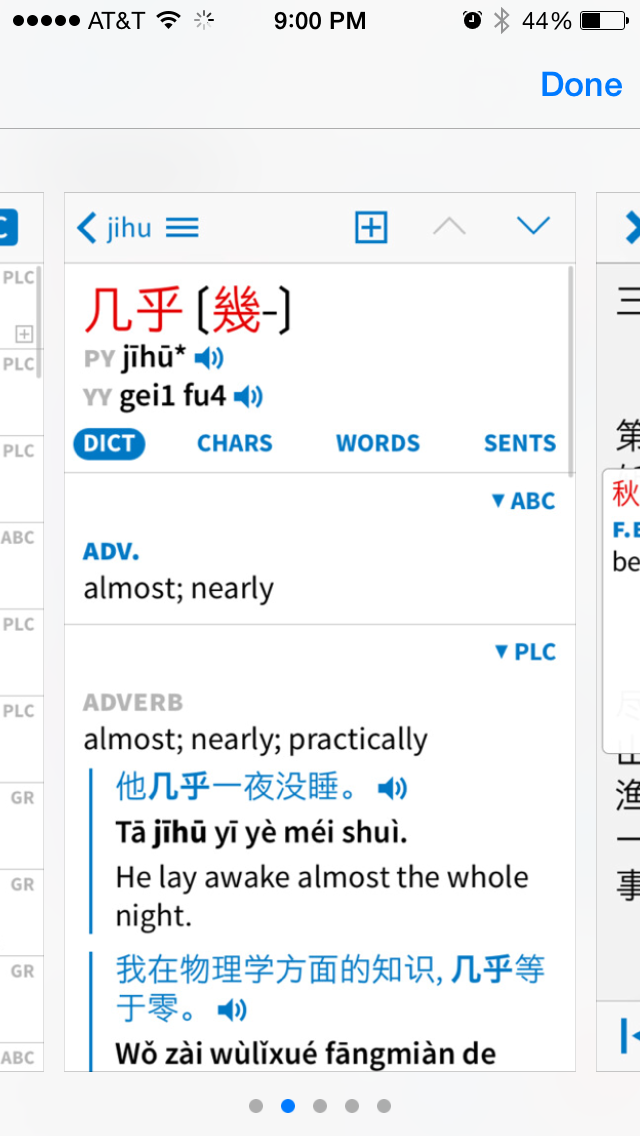
      How many of you hate it when Google translate doesn't get it right?!?! I know I do!! In Chinese class our teacher has introduced us to a handy app. This app helps us with our weekly journals. It's an extension of a translator that has more gadgets. Here is the App Store’s description of it: "Pleco is the ultimate Chinese learning companion. It is an integrated dictionary / document reader / flash card system with full screen handwriting input and live OCR that comes from a company that's been making the world’s best mobile Chinese learning apps since 2001". I recommend you guys to download it! It's really helpful! It's called Pleco and you can find it in the App Store!
Here are some images of what the app looks like: 


Thanks for reading! 

-Melissa S. 

Thursday, February 26, 2015

Useful Links

Readability-score.com

Hey peeps! 

     Just in case y'all have never come across this website, https://readability-score.com is a great place to research some statistics about what you're reading or writing. First of all, it's easy to use! All you have to do is paste some text into the box and the stats come up on the side. It mainly shows you the "Reading Ease" of the text:


Next, they show who should be expected to read the text, or the average grade level:


 Finally, it gives statistics such as character, syllable, and word count:


- Giselle D.

Monday, February 16, 2015

Useful Links

SparkNotes
Hey y'all!

     How have y'all been? Well, I wonder if you have ever heard of this site called SparkNotes...I can say that it's a good site, especially when you need help summarizing or understanding the literature you're reading at the time. With SparkNotes, you can look up a book and read all about it to get a better understanding of it. SparkNotes is one of the best places to go for your studying needs and confusion. SparkNotes will give you multiple ways to study, such as online, on your eReader or with legendary books. SparkNotes will guide you, give you summaries of novels and the chapters in them. Generally, it will give you an insightful critical analysis of over 500 works of English literature, History, Math, Biology, and other subjects. You can also take quizzes and study flashcards for the subjects you're looking to study for. I think one of the best parts of all is that this site offers books and online content to prepare you for the SAT, ACT AP, Subject Tests, and GRE. We all need that.

Choose or type in any Book:


Cater to your needs:


Have a day,

- Felicinda J.

Saturday, January 31, 2015

Useful Links

Word Hippo
Hey y'all!

     How has your week been? Well today I will write about one of the websites that was posted towards the start of our blog for this section, but was never expounded on. I was in search of a word whilst writing something for class, but I could only think of the phrase. So I went to Word hippo. Word Hippo helped me find exactly what I was looking for. When you can not think of a word but have a certain phrase that relates to it, Word Hippo is a great site to use. It is like an online dictionary or thesaurus with a wide array of other tools such as; antonyms, rhyming words, translation and much more. I am very sure that there are other sites that do the same, but I like this one because it has a cute hippo as the logo.

This is where you type the word in:


Here is an example of Word Hippo in action:


I suggest that this site is really great for people who wright poems and the like. Well, happy word searching!

- Felicinda J.

Thursday, January 15, 2015

Useful Links

'What I learnt in Geography this week.....'

     While researching about sampling methods for our Fieldwork, Sophie and I came across a blog created by Vicki The Geography Student. The blog was titled 'What I learnt in Geography this week.....' and talks about everything form population growth to glaciers and tornadoes. She discusses any geographical news that interests her as well as what she learns from her teacher. Nowadays, she has graduated from high school and started a new blog about her experiences at university called 'What I learnt in Physical Geography and Oceanography this week.....'! I found a ton of information that would be useful for our first unit on Populations in Transition and our second, Disparities and Change.

You are formally encouraged to click on the following link:
http://geography-student.blogspot.com

- Giselle D.

Saturday, January 3, 2015

Useful Links

    Purdue OWL Citations

Hi Everyone!

     In school, we do various things that consists of certain types of formatting and citations...well at least in our school we do. In most high schools, you are told to do MLA format for everything, and some people have difficulty trying to learn how to do this. Well, in school we use this website called Purdue OWL which helps with formatting and citing research papers and essays. You may have heard of this before; if you have, I'm sure you'd agree that this site is a life savior! You can't always rely on those sites that automatically do citing for you because some teachers may notice and deduct points. Believe me - your teacher may not have said anything, but they've probably noticed and they do not appreciate it. Purdue OWL is an Online Writing Lab created by Purdue University. The site gives writing resources and instructional material for free - no charge at all. I'll give you the link down below. You can just go the site, and it will help you with anything literary you need help with! I use this site all the time for my citation needs because there are various sources I come across and have difficulty citing. This site gives you the specifics of what needs to be done for these difficult sites.

     Purdue OWL's main mission is to guide and perfect your writing, and they provide examples and instructions to help. My fellow IB Survivalists and I recommend this site because, as I mentioned earlier, the site is a life savior!


Heres the link so you can check it out: https://owl.english.purdue.edu/owl/


- Felicinda J.

Thursday, December 18, 2014

Useful Links

phet.colorado.edu

Interactive Online Experiments 


Hi guys!

     In SL Chemistry, students have to complete a minimum number of hours for labs. If you are studying about a certain topic and you don't have the materials to complete a certain lab, this can become a problem. Our teacher contacted teachers all around the world, asking them how to solve this problem. She found that it is acceptable to complete labs online via simulations. The website that was suggested was http://phet.colorado.edu. This website is full of possible labs concerning everything from physics to biology to quantum chemistry. Since we just finished a unit about polarity, we completed the online lab called "Molecule Polarity." After this, we still had to write a lab report though!


Just some of the simulations available to students!


- Giselle D.

Friday, December 12, 2014

Useful Links

     WebMATH.com


     Whilst at home, I was struggling with turning a fraction into a decimal by hand without the use of a calculator. I've done it before; it's just that I forgot how because it's been a while. I'm trying to refresh my memory on how to solve certain things without the use of a calculator because in Math SL, we're not allowed to use a calculator on Paper 1. Therefore, learning how to do things by hand without the use of a calculator is a necessity. So I turned to Google for help on how to turn a faction into a decimal. I come across this website name WebMATH and it showed me the steps on how to turn a fraction into a decimal.

     This website was a closest I could get to a good teacher being that I wasn't at school to ask my math teacher for help. Discovery Education gives opportunities for students to learn digitally. WebMATH is a website that helps you with the math work of your choice and it generates specific mathematical questions, problems entered by the user at any given time and valid answers with step guidance as to how to perceive the problem.

Here's the website:
http://www.webmath.com

- Felicinda J.

Saturday, December 6, 2014

HL French

French Grammar Help


Hello Everyone!

     I hope you guys had a wonderful week! Our homework for french class this weekend is a writing task. What's hard about this is not the questions - but conjugating the verbs! French verbs have never been my forte. Therefore I must look for ways to improve and cope with this challenge. Fortunately, we have the internet and no longer need to spend a ton of time with bescherelles (French Grammar Books). Ms. Marianne, our french teacher, introduced us to a wonderful time saving website regarding verbs.

    The link to the website is http://la-conjugaison.nouvelobs.com/. This website is very simple to use and navigate through. All you do is type in the verb that you're using in the search bar and a list of conjugations in different tenses will appear. Just like a bescherelle! It's like MAGIC! Plus, it gives you the definition of the word, synonyms, the option to translate and to create your own exercises to reinforce your verb skills. They also have an app! So if you're in France and don't know how to conjugate a verb in a particular tense you can just pull out this handy app. It's just like having a pocket size bescherelle! Here are screenshots of the website:


This is where you would type in your verb.


    Here is an example using the verb "manger" which means "to eat".

     You can scroll down to see more tenses of each verb. Depending on what you select, the 5 squares at the top will give you either a definition, synonym, translation, or exercise to reinforce your wonderful skills.

     I hope you guys find this website as helpful as I did! If you're as bad as french verbs as I am, don't worry! We got this! Here's a fun verb related quote that one of my friends showed me and I found it really cool. "Oublie le passe qu'il soit simple ou compose. Participe au present et ton futur sera plus-que-parfait."

- Melissa S.

Saturday, November 29, 2014

Useful Links

Cows Explain Politics

Hi Everyone!

     I hope you all have had a wonderful Thanksgiving. A useful website that I will be discussing this week came to my attention from my good friend, and fellow IB Survivalist blogger, Jordyn K. The website is called "Cows Explain Politics". Since Jordyn and I are both studying HL History, we were given endless vocabulary words (mostly regarding politics) that typically ended is "ism". Now, I'm sure a lot of you must know how challenging it is to associate definitions to vocabulary words that both sound and look alike. However, after discovering this website, we found a fun way to remember these terms! The website helps explain the difference between political terms by using a quirky analogy: cows! For example, the website explains Capitalism using cows like so:

Capitalism: You have two cows. You lay one off, and force the other to produce the milk of four cows. You are surprised when she drops dead.


     Since history is an equally frustrating and exciting subject, this website helps create a balance between the two with humour. Ever since this website was brought to my attention, I have always referred back to it whenever I was confused about any political term. Enjoy!


Here is a screenshot of the top of the webpage!

Also, please comment below any websites that you might find useful! We could feature it on our blog and give you credit :)

- Sophie F.

Sunday, November 16, 2014

Useful Links

Posemaniacs.com

Hello Everyone!

     This week, I'm going to share one of my favorite drawing reference websites with y'all. Posemaniacs has around 1200 different poses with the option of 2 genders and ages. Not only can you view a multitude of poses, but you can also rotate them in which ever way you need. But their poses aren't restricted to just bodies. They have four widgets which include 30 Second Drawing, Negative Space Drawing, Random Pose Viewer, and Hands for Drawing. There's not much more to say on this website due to it being all different types of poses. So just go check it out for yourself! Got any tips, tricks, or websites for art? Post them in the comments!


Here is a screenshot of the website, along with the complete list of all their types of poses.  Have fun!!

- Jordyn K.

Thursday, November 6, 2014

Useful Links

Bibliography Help


I'm sure all of you guys have heard of EasyBib but just in case here's the link:

http://www.easybib.com

     In the Middle Ages, our parents had to use MLA, APA, and Chicago citation books in order to arrange their references correctly. Nowadays, the internet will do it for us. All you need to do is insert information such as date, author, and website name. One of the boxes asks for publisher/sponsor name. It is usually found at the very bottom of your website and in the form of a university, foundation, or agency. I suggest that you refrain from including websites such as Wikipedia.com, Answers.com, or blogs since they aren't as reliable as sites that end with .net or .gov. Lastly, you have the choice of citing a bunch of different kinds of texts from podcasts to speeches to Youtube videos!


This is where you paste your link!


These are the types of citations you can use!

- Giselle D.

Saturday, October 25, 2014

Useful Links

Links That Can Improve Your Studies


Hi Everyone!

I have put together a post about several links that I believe you can find useful, whether you're studying for the IB Diploma or not! I have organized the links to make it easier for you to find them! The miscellaneous links at the bottom of this post aren't necessarily for IB, but there are useful nonetheless!

Language Learning:
  • duolingo.com
  • memrise.com
  • bbc.co.uk/languages
  • livemocha.com
  • busuu.com
  • verbling.com
  • mangolanguages.com
Math:
  • wolframalpha.com
  • projecteuler.net
  • mathrun.net 
  • mathway.com
Life Hacks:
  • zenhabits.net
  • lifehacker.com
  • artofmanliness.com
  • lifehackninja.com
Random Knowledge:
  • mentalfloss.com
  • snopes.com
  • nowiknow.com
  • sporcle.com
  • ifeveryoneknew.com
DIY/How To's:
  • instructables.com
  • thedailymiscellany.com
  • wikihow.com
  • wonderhowto.com
  • howstuffworks
  • howcast.com
Programming:
  • codeacademy.com
  • learncodethehardway.com
  • htmldog.com
  • trypython.org
  • rubymonk.com
  • codingbat.com
Books:
  • gutenburg.org
  • librivox.org
  • bartleby.com
  • poemhunter.com
English:
  • WordHippo.com 
  • hundredzeros.com 
  • polishmywriting.com
  • marker.to
  • enotes.com
  • sparknotes.com
Arts:
  • kleki.com
  • kuler.adobe.com
  • aviary.com/myna

Miscellaneous Links:
  • WordHippo.com - This is a website that will help you find the work you're looking for when you can only think of a phrase
  • slader.com - This website gives you answers to most textbook problems 
  • screener.com - This website records movies on your desktop and sends them straight to YouTube
  • goo.gl - This website shortens long URLs and converts URLs into QR codes
  • unfurlr.come - This website finds the original URL that's hiding behind a short URL
  • copypastecharacter.com  - This website copies special characters that aren't on your keyboard
  • lovelycharts.com - This website creates flowcharts, network diagrams, sitemaps, etc.
  • office.com - This website downloads templates, clipart and images for your Office documents 
  • jotti.org - This website scans any suspicious files or email attachments for viruses 
  • wolframalpha.com - This website gets direct answers without having to research
  • printwhatyoulike.com - This website prints web pages without the clutter
  • joliprint.com - This website re-formats news articles and blog content as a newspaper
  • e.ggtimer.com - This website is a simple online timer for your daily needs
  • pdfescape.cpm - This website lets you quickly edit PDFs in the browser itself
  • tubemogul.com - This website simultaneously upload videos to YouTube and other video sites
  • spypig.com - This website now gets read receipts for your email
  • google.com/webfonts  - This website has a good collection of open source fonts
  • lifestream.com - This website broadcasts live events over the web, including your desktop screen
  • join.me - This website shares your screen with anyone over the web
  • webtransfer.com  - This website is great for sharing really big files online
  • hundredzeros.com - This website lets you download free Kindle books
  • polishmywriting.com - This website checks your writing for spelling or grammatical errors
  • marker.to - This website easily highlights the important parts of a web page for sharing
  • kleki.com - This website creates paintings and sketches with a wide variety of brushes
  • bubbl.us - This website allows you to create mind maps and brainstorm ideas in the browser
  • kuler.adobe.com - This website gives you color ideas and also extracts colors from photographs
  • privnote.ocm - This website helps you create text notes that will self-destruct after being read
  • aviary.com/myna - This website is an online audio editor that lets you record and remix audio clips online
  • disposablewebpage.com - With this website you can create a temporary web page that will self-destruct
  • timertime.com - This website helps you create timelines with audio, video and images
  • stupeflix.com - This website can make a movie out of you images, audio and video clips
  • minutes.io - This website quickly captures effective notes during meetings
  • pancake.i - This website helps you create a free and simple website using your Dropbox account
  • mixlr.com - This website broadcasts live audio over the web
  • otixo.com - This website can easily manage your online files on Dropbx, Google Docs, etc
  • ifttt.com - This website creates a connection between all your online accounts
  • flashnotes.com - This website has flashcards pertaining to anything you're learning 
  • scholar.google.com  - This website helps you find more relevant information for writing essays
  • http://www.mangolanguages.com - This website makes learning languages quick and easy
  • enotes.com - This website has summaries of Masters works and Minors poems
  • mathway.com - This website solves difficult math problems
  • sparknotes.com - This website has summaries of classic literature
- Felicinda J.